
To write an equation in LaTeX, put the maths between delimiters — $…$ inside a sentence, \[ … \] on its own line — and write it with a few building blocks: ^ and _ for superscripts and subscripts, \frac{}{} and \sqrt{} for fractions and roots, backslash names such as \alpha for symbols, and \sum or \int with limits. Those five pieces cover most of the equations in a typical course or paper.
Each piece below comes with its code and its result. You can try every example as you go, in Google Docs™, without installing LaTeX (section 7).
1. Math mode: tell LaTeX where the maths is
Everything mathematical goes into math mode. There are two kinds:
| Write | Result | Use for |
|---|---|---|
The area is $\pi r^2$. | The area is $\pi r^2$. | maths inside a sentence (inline) |
\[ E = mc^2 \] | a centred line of its own | an equation on its own line (display) |
Inside math mode, letters are set in italics as variables, spaces you type are ignored, and LaTeX does the spacing around = and + itself. Outside it, the same characters are ordinary text. $$…$$ and \(…\) also exist; which of the four to use, and where each breaks, is in LaTeX Math Delimiters.
To number an equation, use the equation environment instead of \[ … \]:
1
2
3
\begin{equation}
  a^2 + b^2 = c^2
\end{equation}
2. Superscripts and subscripts: ^ and _, with braces
1
x^2   \qquad   a_n   \qquad   x^{10}   \qquad   a_{n+1}   \qquad   e^{-x^2}
^ and _ take one character. For anything longer, wrap it in braces: x^10 gives $x^10$, which is $x^1$ followed by 0; x^{10} gives $x^{10}$.
3. Fractions and roots
1
\frac{a}{b}   \qquad   \frac{x+1}{x-1}   \qquad   \sqrt{2}   \qquad   \sqrt[3]{x}
\frac takes two groups in braces, numerator then denominator. They nest: the quadratic formula is
1
x = \frac{-b \pm \sqrt{b^2 - 4ac}}{2a}
4. Greek letters and symbols: backslash names
Symbols are written as a backslash and a name:
| Code | Result | Code | Result |
|---|---|---|---|
\alpha, \beta, \pi | $\alpha, \beta, \pi$ | \le, \ge, \ne | $\le, \ge, \ne$ |
\Delta, \Omega | $\Delta, \Omega$ | \times, \cdot, \pm | $\times, \cdot, \pm$ |
\infty | $\infty$ | \to, \Rightarrow | $\to, \Rightarrow$ |
\sin x, \log x | $\sin x, \log x$ | \in, \subset | $\in, \subset$ |
Capital Greek letters that look like Latin ones (A, B, E, …) have no command; type the Latin letter. Function names such as \sin and \log keep the name upright, as it should be; plain sin would be three italic variables.
5. Sums, integrals and limits
Large operators take their limits with _ and ^:
1
\sum_{k=1}^{n} k   \qquad   \int_0^1 x^2 \, dx   \qquad   \lim_{x \to 0} \frac{\sin x}{x}
The \, is a thin space, the usual way to set off $dx$. Brackets that grow with their content are written with \left( and \right):
1
\left( \frac{a}{b} \right)^2
6. Five mistakes beginners make
- Forgetting math mode.
x^2outside$…$is an error; LaTeX stops with! Missing $ inserted. - Leaving out braces.
x^10and\frac12+1do not mean what they look like; usex^{10}and\frac{1}{2}+1. - Typing words inside maths.
$speed = d/t$sets speed as five italic variables. Use\text{speed}(from theamsmathpackage). - Unbalanced brackets. Every
{needs its}, and every\leftits\right. - Expecting
\\to start a new line. In a display it does nothing on its own; equations over several lines needalign*oraligned.
7. Try it in Google Docs™
You do not need a LaTeX installation to practise. With the free LaTeXFlow add-on, Google Docs™ shows what your LaTeX produces:
- Install the add-on and open Extensions → LatexFlow → Open Equation Panel (install walkthrough).
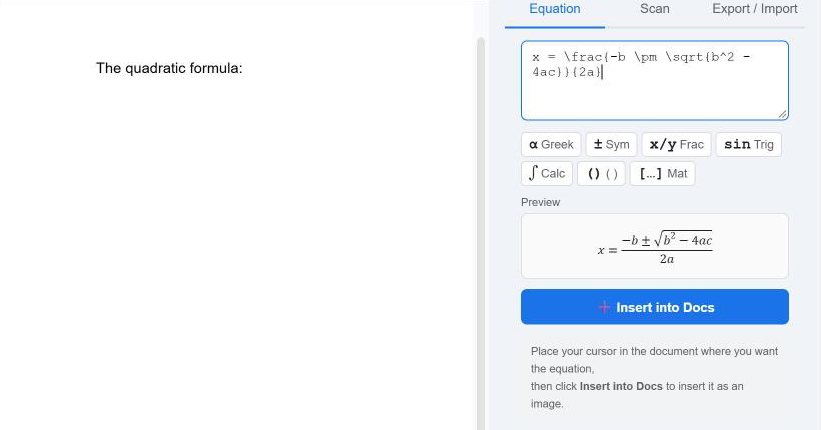
- On the Equation tab, type an equation from this post, for example
x = \frac{-b \pm \sqrt{b^2 - 4ac}}{2a}. The live preview shows the result as you type, so a missing brace shows up at once. - Place the cursor in the document and press ➕ Insert into Docs. The equation goes in as a display equation.
- For several equations in a sentence or a page, type them straight into the document between
$…$or$$…$$, then on the Scan tab press 🔍 Scan Document and ⚡ Convert All.
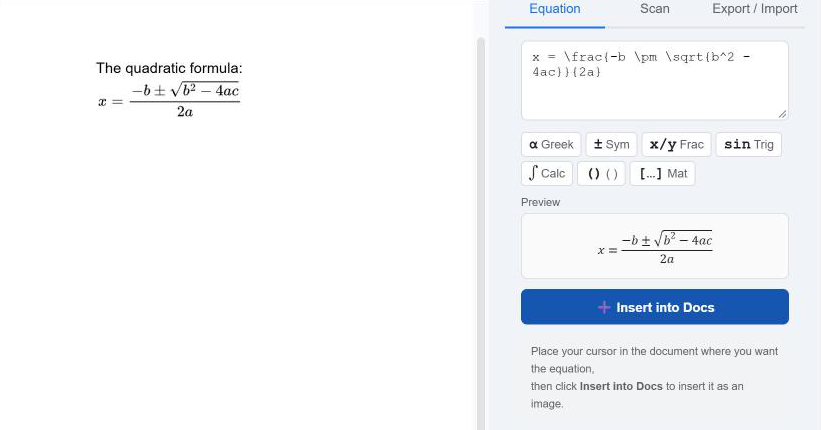
Each converted equation keeps its LaTeX, so you can select it, press ↩ Revert to LaTeX, fix it and convert it again.
8. FAQ
How do you write an equation in LaTeX? Put it in math mode — $…$ inline, \[ … \] or equation on its own line — and build it from ^, _, \frac, \sqrt, backslash symbol names and operators such as \sum and \int.
What is a LaTeX equation? An equation written as plain-text LaTeX code, such as \frac{a}{b}, that LaTeX (or a renderer such as MathJax) typesets into a formatted formula.
How do I write math in LaTeX without installing it? Use an online editor such as Overleaf, or practise inside Google Docs™ with the LaTeXFlow Equation tab, which previews the LaTeX as you type (section 7).
How do I number equations in LaTeX? Use \begin{equation} … \end{equation}. Add \label{eq:name} inside it and refer to it with \eqref{eq:name}.
9. Summary
- Math mode:
$…$inline,\[ … \]orequationfor a line of its own. ^and_with braces;\frac{}{}and\sqrt{};\alpha-style names;\sumand\intwith limits;\left( … \right).- Practise with a live preview: LaTeXFlow for Google Docs™, Equation tab, type, Insert into Docs.