
To put a LaTeX equation on multiple lines, wrap the lines in an environment: align* (or aligned inside \[ … \]) when the equals signs should line up, gather* when each line is simply centred, multline* for one formula too long for a line. End each line with \\; a \\ on its own, without one of these environments, does not break the line.
The sections below give each environment with its output, then how to get the same equations into Google Docs™, where the built-in equation editor stops at one line.
1. Which environment to use
| You want | Use | Numbered? |
|---|---|---|
Several equations, = aligned | align* | no (align numbers each line) |
An aligned block inside \[ … \] or $$ … $$ | aligned | as the outer display |
One equation broken at =, one number | split inside equation | one number |
| Several lines, centred, no alignment | gather* | no (gather numbers each line) |
| One long formula over two or more lines | multline* | no (multline numbers the last line) |
| A piecewise function | cases | — |
All of them come from the amsmath package: add \usepackage{amsmath} to the preamble.
2. align* and aligned: line up the equals signs
Put & just before the symbol to align on, and \\ at the end of every line but the last.
1
2
3
4
\begin{align*}
  (a+b)^2 &= (a+b)(a+b) \\
          &= a^2 + 2ab + b^2
\end{align*}
align* opens its own display, so it is never put inside \[ … \]. When you are already inside a display — in a $$ … $$ block, or inside equation — use aligned instead; it takes the same & and \\:
1
2
3
4
5
6
\[
\begin{aligned}
  x &= r\cos\theta \\
  y &= r\sin\theta
\end{aligned}
\]
3. split: one equation, one number
A long derivation that should carry a single equation number goes into split inside equation:
1
2
3
4
5
6
\begin{equation}
\begin{split}
  f(x) &= (x-1)^2 + 2(x-1) \\
       &= x^2 - 1
\end{split}
\end{equation}
The number is placed once, centred on the block.
4. gather*: centred lines without alignment
1
2
3
4
\begin{gather*}
  a + b = c \\
  d = e
\end{gather*}
5. multline*: one formula that is too long
The first line sits on the left, the last on the right:
1
2
3
4
\begin{multline*}
  p(x) = 3x^6 + 14x^5y + 590x^4y^2 + 19x^3y^3 \\
         - 12x^2y^4 - 12xy^5 + 2y^6 - a^3b^3
\end{multline*}
6. cases: piecewise functions
1
2
3
4
5
6
7
\[
f(x) =
\begin{cases}
  x^2 & x \ge 0 \\
  -x  & x < 0
\end{cases}
\]
The & separates the value from its condition.
7. Why a double backslash on its own does nothing
The most common attempt is this:
1
\[ a = b \\ c = d \]
It prints a = b c = d on one line. A display without an environment is one line by definition, and \\ only means “new row” inside an environment that has rows. Wrap the lines in aligned or gathered:
1
\[ \begin{aligned} a &= b \\ c &= d \end{aligned} \]
8. Multi-line equations in Google Docs™
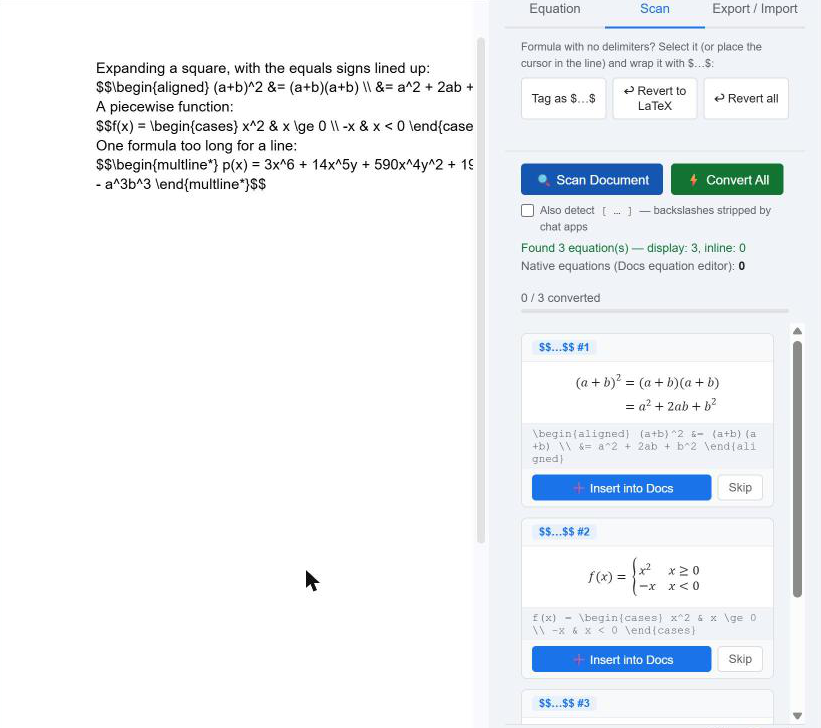
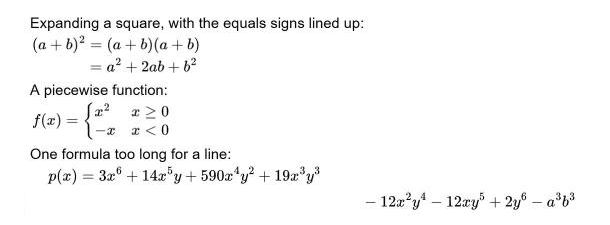
Google Docs™’ own equation editor (Insert › Symbols › Equation) makes one line per equation box: Enter and Shift+Enter leave the box instead of starting a new line, and there is no cases structure (what the editor can and cannot build). Writing the equation as LaTeX text and converting it gets around that. We tested every environment in this post with the LaTeXFlow add-on on 3 November 2026: each rendered on two or more lines, aligned as in LaTeX.
- In the document, type the whole equation as text inside a delimiter, in its own paragraph:
$$\begin{aligned} (a+b)^2 &= (a+b)(a+b) \\ &= a^2 + 2ab + b^2 \end{aligned}$$ - Open Extensions → LatexFlow → Open Equation Panel.
- On the Scan tab, press 🔍 Scan Document and check the card’s preview.
- Press ⚡ Convert All (or ➕ Insert into Docs on that card). The text becomes a rendered equation on several lines.
Two things to know:
- The delimiter is required. A
\begin{equation}…\end{equation}typed on its own, with no$$around it, is not detected; put it inside$$ … $$. - One equation at a time: the Equation tab takes multi-line LaTeX too. Type it into the box, check the live preview, place the cursor and press ➕ Insert into Docs. It always inserts a display equation.
Each converted equation keeps its LaTeX: select it and press ↩ Revert to LaTeX to edit the text. If you later export the document to a .tex file, environments like align*, gather* and multline* are written on their own, not nested inside \[ … \]; our test export compiled with pdfLaTeX without errors.
9. FAQ
How do you write an equation on multiple lines in LaTeX? Wrap the lines in align* (aligned at &), gather* (centred) or multline* (one long formula), and end each line except the last with \\.
How do I add a line break in a LaTeX equation? With \\, but only inside an environment that has rows. In a plain \[ … \] it does nothing (section 7); use aligned inside it.
What is the difference between align and aligned? align starts its own display and numbers each line; aligned is a block used inside a display you already opened, such as \[ … \], $$ … $$ or equation.
Can Google Docs™ do multi-line equations? Not in its own equation editor. Write the equation as LaTeX with aligned, cases or multline* inside $$ … $$ and convert it with the free LaTeXFlow add-on (section 8).
10. Summary
- Aligned lines:
align*, oralignedinside a display. Centred:gather*. One long formula:multline*. One number for several lines:splitinequation. Piecewise:cases. \\breaks a line only inside one of those.- In Google Docs™, type the environment inside
$$ … $$, then Scan Document and Convert All — every line renders, and the LaTeX stays with the equation. Get the add-on: LaTeXFlow for Google Docs™.