
Here is a LaTeX homework template you can download and compile as it is: homework-template.tex. Fill in your name, course and assignment in four lines at the top, replace the sample problems, and compile with pdfLaTeX, in Overleaf or on your own computer.
It works the same for a problem set, a worksheet with solutions or a short take-home exam. The rest of this post explains what is in the file and how to fill it, including a route for writing the problems in Google Docs™ first.
1. What the template gives you
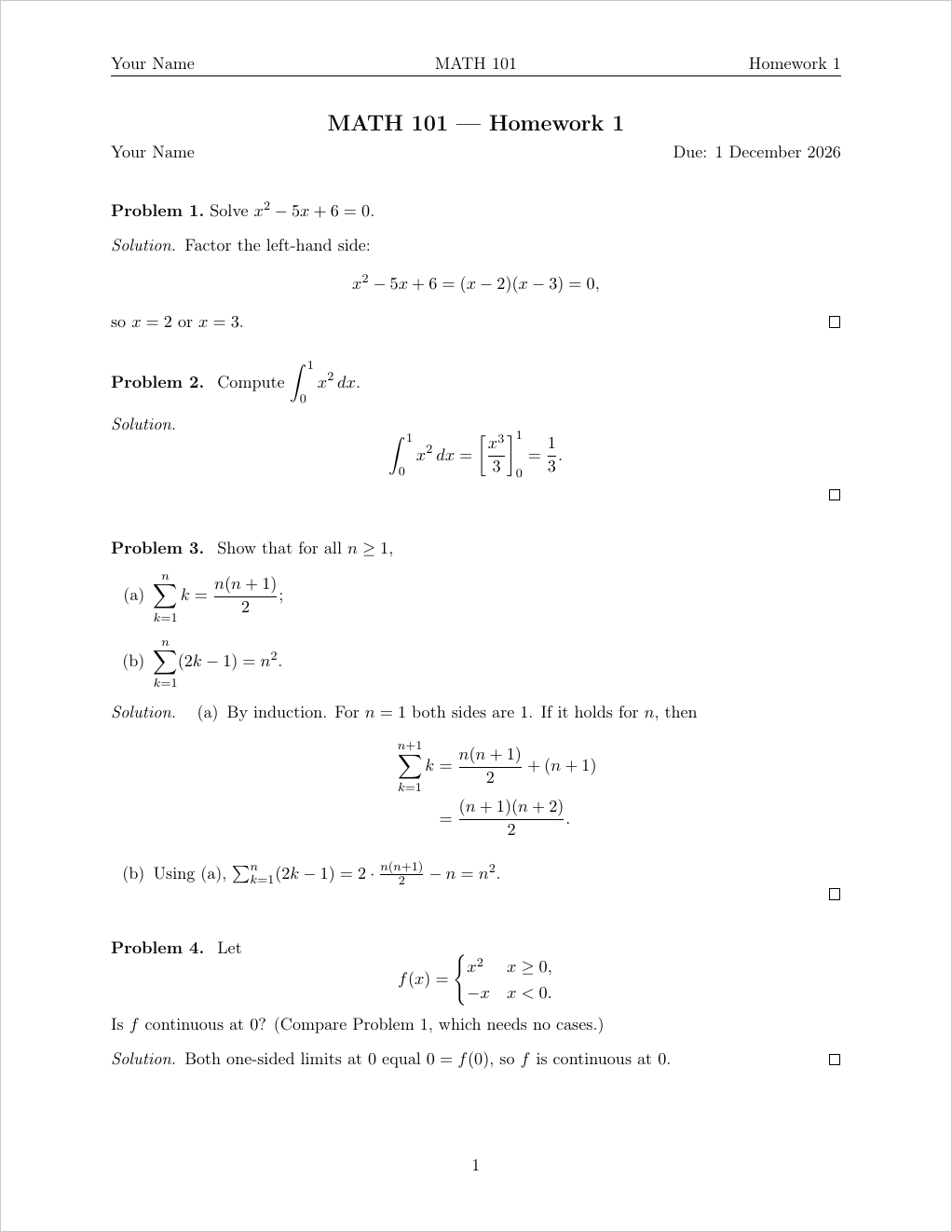
- A header on every page with your name, the course and the assignment, and the page number at the bottom.
- A title line with the course, assignment, name and due date.
- Numbered problems: each
\begin{problem}prints Problem 1., Problem 2., … and can be referred to with\labeland\ref. - Solutions that end with a square, using the
amsthmproof environment. - Sample content that shows the common pieces: an inline equation, a display equation, an
align*derivation, acasesdefinition and an (a)/(b) sub-list. - Standard packages only:
geometry,amsmath,amssymb,amsthm,enumitem,fancyhdr. Every LaTeX installation and Overleaf has them.
We compiled the file with pdfLaTeX before publishing it: no errors, no warnings, one page.
2. Fill it in
- Download homework-template.tex.
- In Overleaf, create a New project → Blank project, and replace the contents of
main.texwith the file. Locally, open it in your editor. Edit the four lines under
Your details:1 2 3 4
\newcommand{\studentname}{Your Name} \newcommand{\course}{MATH 101} \newcommand{\assignment}{Homework 1} \newcommand{\duedate}{Due: 1 December 2026}
Replace the sample problems. Each one has this shape:
1
2
3
4
5
6
7
\begin{problem}
Solve $x^2 - 5x + 6 = 0$.
\end{problem}

\begin{solution}
...
\end{solution}
- Compile. In Overleaf that is the Recompile button; locally, run
pdflatex homework-template.tex(twice if you use\ref, so the numbers settle).
To hand out the problems without solutions, delete the solution blocks or comment them out with %.
3. Writing the problems in Google Docs™ first
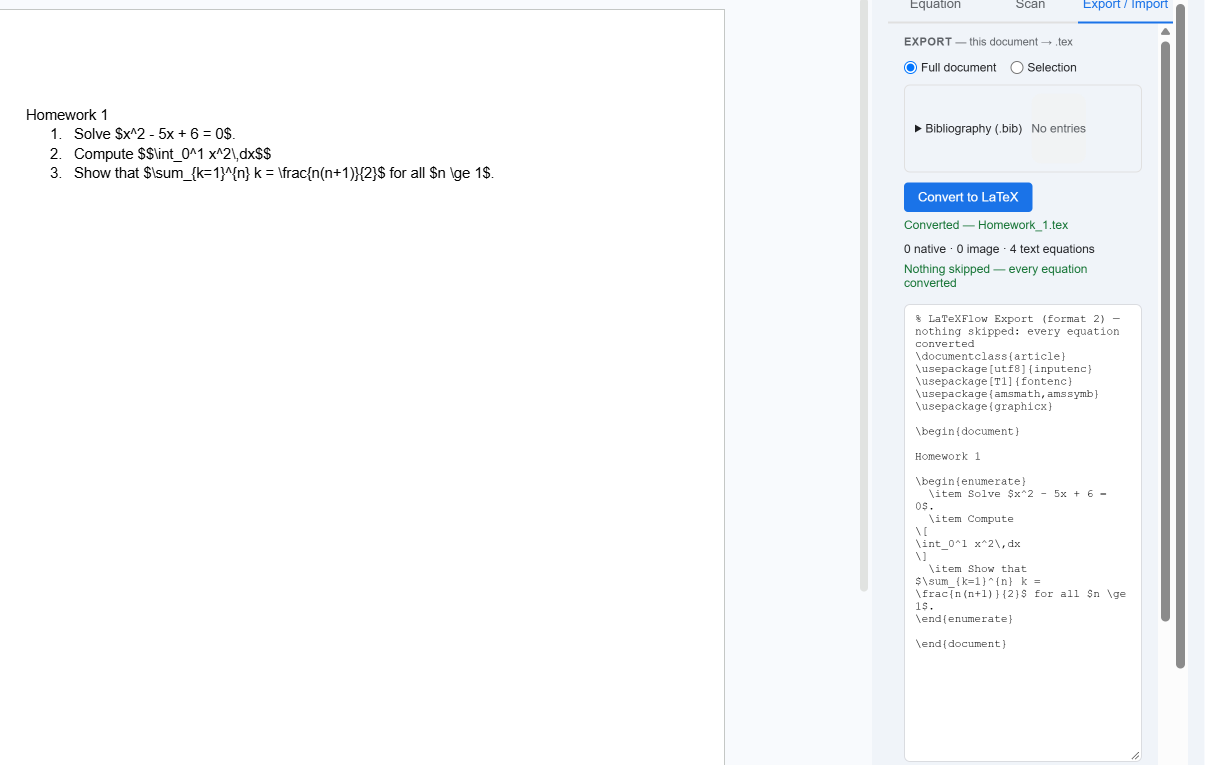
If you would rather type the problems where you already work — or a co-teacher drafts them in Google Docs™ — write them there and let the LaTeXFlow add-on produce the LaTeX:
- In Google Docs™, write the problems as a numbered list, with maths as LaTeX between
$…$(inline) or$$…$$(display), or as Docs’ own equations. - Open Extensions → LatexFlow → Open Equation Panel, go to the Export / Import tab (Export needs a license key) and press Convert to LaTeX.
- Press Download .tex or Copy .tex. The numbered list arrives as
\begin{enumerate} … \item …, display equations as\[ … \], and inline ones stay in$…$. - Copy the text of each
\iteminto a\begin{problem} … \end{problem}block of the template.
The problems keep their equations exactly as written, and the template supplies the layout. A full example of a worksheet exported this way, with what each part becomes, is From a Google Docs™ Worksheet to a .tex File You Can Open in Overleaf, Plus a LaTeX Template.
4. FAQ
Is there a LaTeX template for homework? Yes — the file above. It needs no special class or package, so it works in Overleaf and in any local LaTeX installation.
How do I write a problem set in LaTeX? One problem block per question and one solution block per answer, as in section 2. Use \[ … \] for display equations and align* for derivations over several lines.
How do I number problems and parts in LaTeX? The template numbers problems automatically. For parts (a), (b), (c), use \begin{enumerate}[label=(\alph*)] inside a problem, as in the third sample problem.
Can I use this template in Overleaf? Yes. Create a blank project and replace main.tex with the file’s contents; it compiles with Overleaf’s default pdfLaTeX.
5. Summary
- Download homework-template.tex.
- Fill in the four details, replace the problems, compile with pdfLaTeX.
- Prefer typing in Google Docs™? Write the problems there and export them with LaTeXFlow, then drop each problem into the template.