
To copy math from ChatGPT to Google Docs™, copy the answer with its copy button and paste it. Docs may turn some of it into equations by itself, and whatever it leaves as LaTeX text, the free LaTeXFlow add-on converts in one scan. Use that button rather than selecting the rendered maths with the mouse: a selection of rendered maths does not carry the LaTeX, and nothing can rebuild it afterwards.
The rest of this post is what we measured on 28 October 2026, so you know what to expect after the paste.
1. The test
Four short answers in the shapes chatbots produce, seven equations in total:
- ChatGPT style: two inline
\(…\)and one display\[…\](the quadratic formula). - Brackets with the backslashes gone: two display equations as bare
[ … ]. This is the shape ChatGPT maths often takes after the backslashes are lost somewhere on the way; the four shapes post covers where it comes from. - Gemini style: one inline
$…$and one display$$…$$. - The same maths rendered, as it looks in the chat window, selected with the mouse.
Each was pasted into an empty Google Docs™ document twice: with a normal paste (Ctrl+V) and with paste without formatting (Ctrl+Shift+V). The account was a regular Google account with the LaTeXFlow add-on installed from the Marketplace.
2. What Docs did on paste
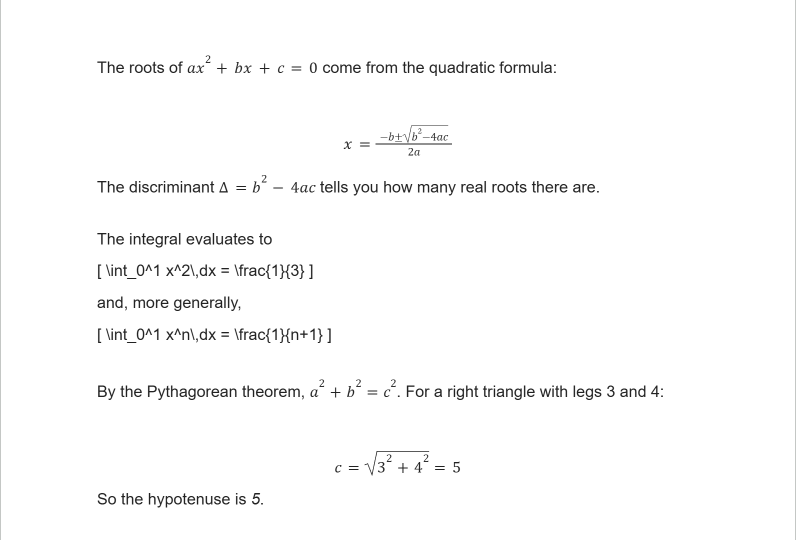
| Shape | After the paste, in this account |
|---|---|
\(…\), \[…\] | Docs equations |
$…$, $$…$$ | Docs equations |
bare [ … ] | LaTeX text, unchanged |
| rendered maths, selected with the mouse | broken text, no LaTeX left |
Both kinds of paste gave the same result. Five of the seven equations became Docs equations without any add-on, including the fraction and square root in the quadratic formula.
This automatic conversion is Google’s, and it does not behave the same in every account. On another account we tested earlier, a short $\pi r^2$ was converted while a longer $$x = \frac{-b \pm \sqrt{b^2-4ac}}{2a}$$ stayed as text. So after a paste, expect a mix: some equations already done, some still LaTeX.
3. Converting the ChatGPT equations Docs left as LaTeX
Whatever is still LaTeX text, the add-on finds and converts.
- Open the panel: Extensions → LatexFlow → Open Equation Panel. First time? The install walkthrough goes through it.
- On the Scan tab, tick Also detect [ … ]. This picks up the bare-bracket shape, and it is off by default in the add-on.
- Press Scan Document.
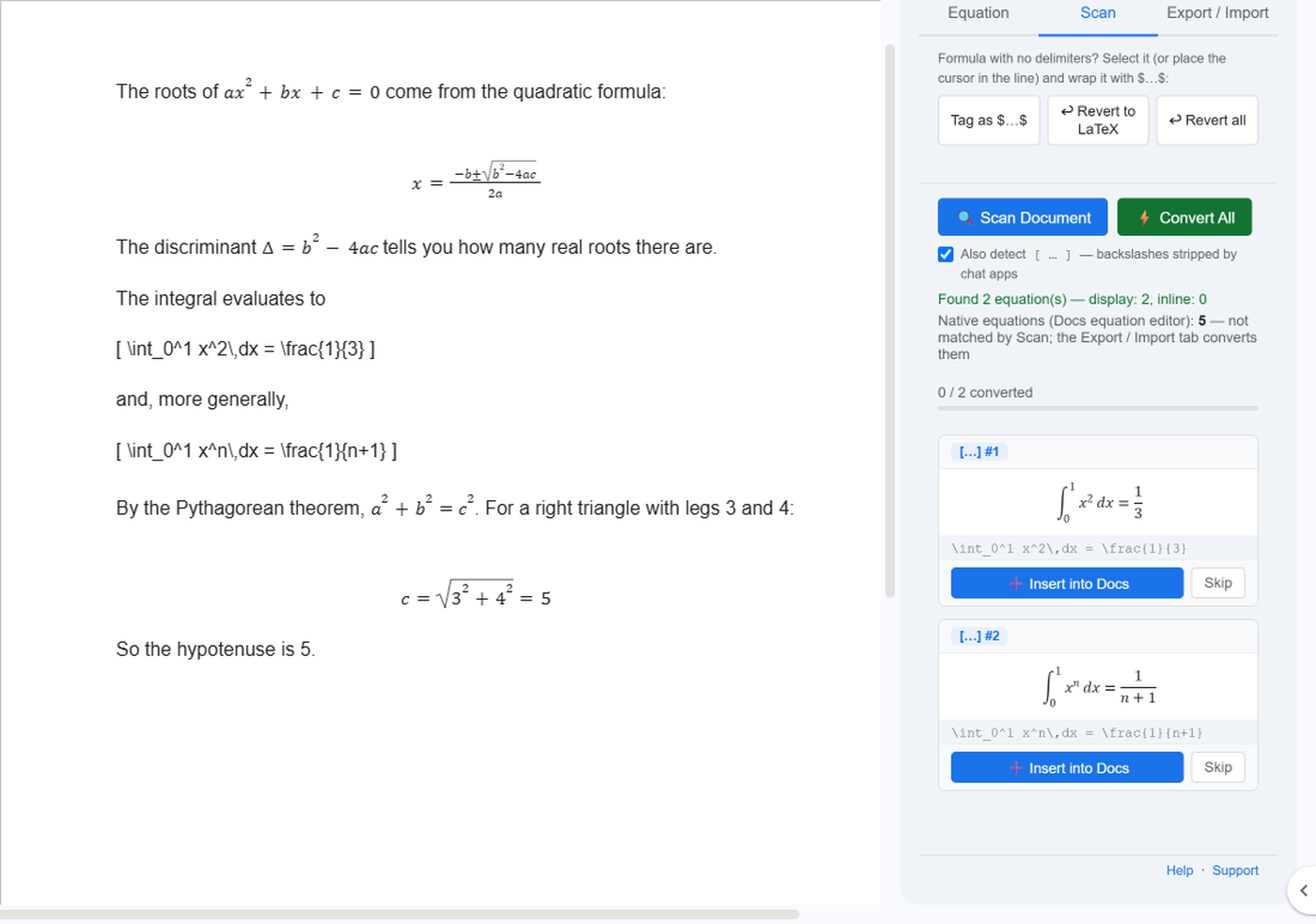
The scan reported Found 2 — the two bracket equations Docs had left — and, on a separate line, Native equations: 5 for the ones Docs had already converted. Nothing was missing: 2 + 5 = 7.
- Press Convert All.
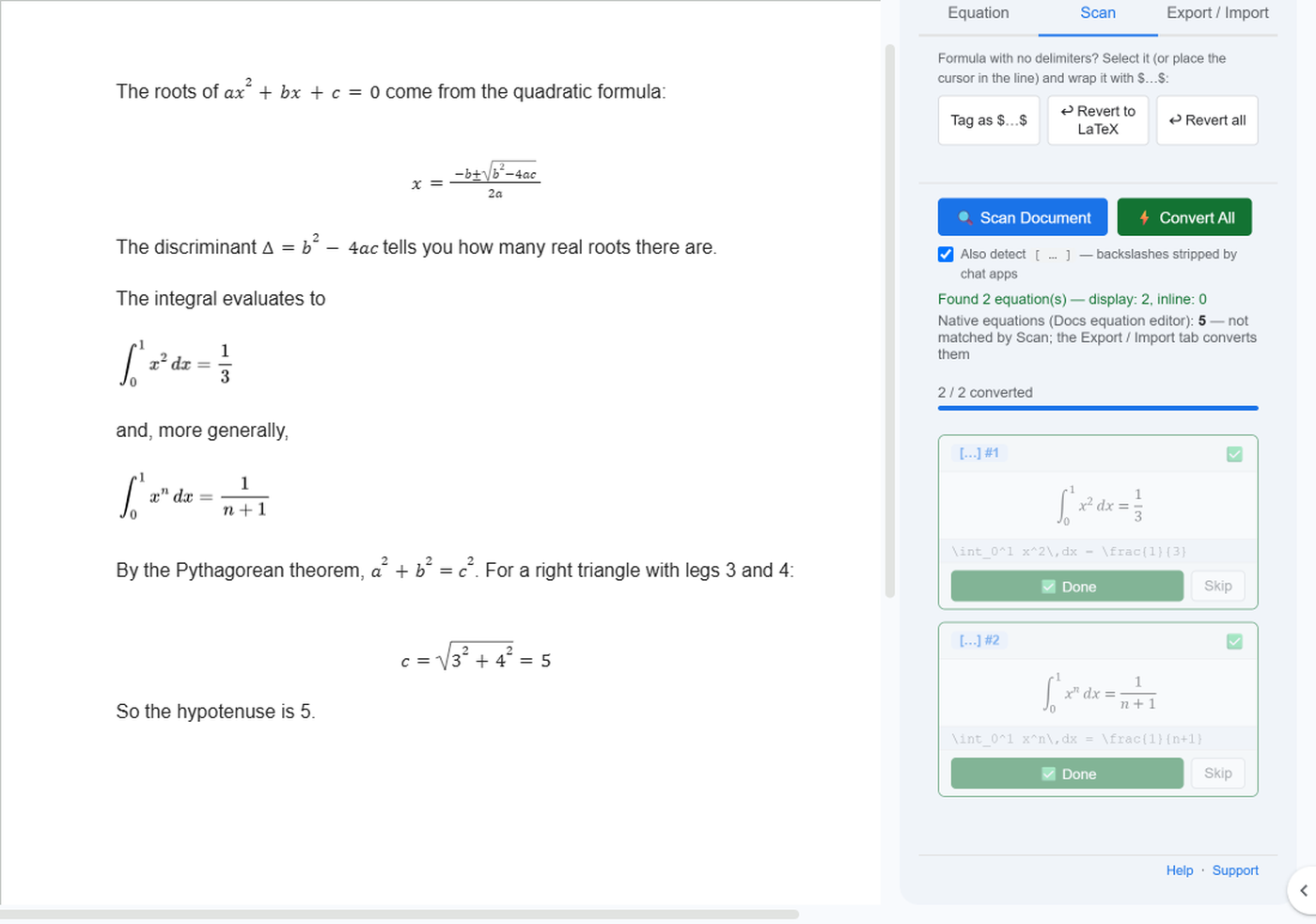
Both bracket lines became rendered equations: 2 / 2 converted. The document now shows every equation as an equation, whichever route it took.
4. The copy that cannot be repaired
Selecting the rendered maths in the chat window with the mouse and copying it gives Docs the characters on screen, not the LaTeX behind them. In our test the result was one symbol per line, parts of the same formula repeated, and no LaTeX anywhere:
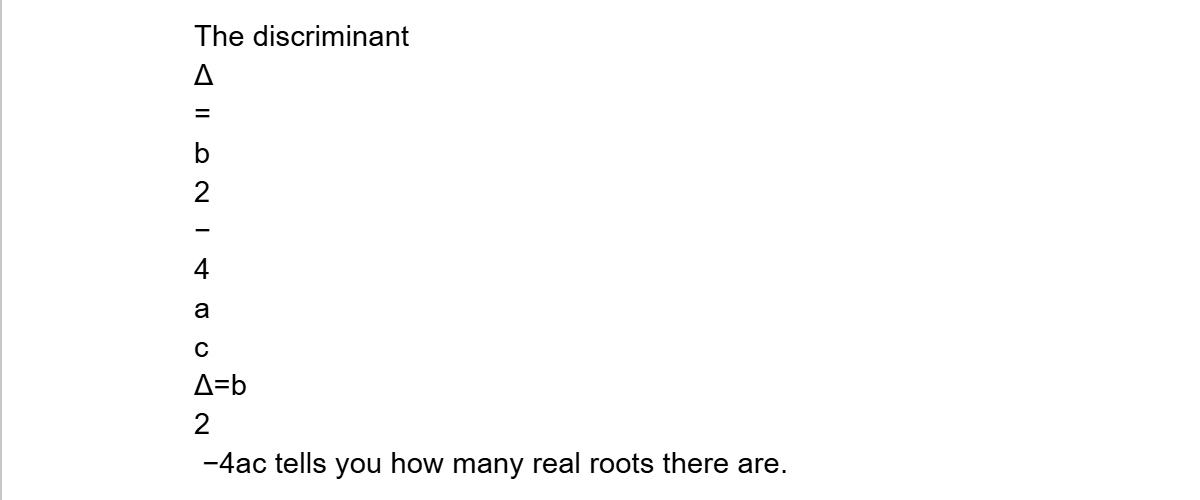
Scan found nothing to convert, because there was nothing left to read. The fix is at the copy step: use the copy button under the answer, which copies the text with its LaTeX, or ask for the answer in LaTeX to begin with (how to ask for maths you can paste).
5. FAQ
How do I copy from ChatGPT to Google Docs™? Press the copy button under the answer, then paste into the document with Ctrl+V. The button copies the text with its LaTeX, so each equation either becomes a Docs equation on the paste or stays as LaTeX that the add-on can convert (sections 2 and 3).
How do I copy and paste math equations in Google Docs™? Paste the LaTeX, not the picture of it. Equations that Docs does not convert on the paste stay as LaTeX text; open LatexFlow, press Scan Document on the Scan tab, then Convert All. The same steps cover Gemini-style $…$ and $$…$$.
How do I copy LaTeX into Google Docs™ from another source? The same way as from a chatbot, whether the LaTeX comes from Overleaf, a .tex file or a web page: copy it with its delimiters — $…$, $$…$$, \(…\) or \[…\] — and paste. Docs may turn some of it into its own equations on the paste, depending on the account; the rest stays as LaTeX text, and Scan Document then Convert All converts it. To bring in a whole .tex file with its headings and lists, see how to convert a LaTeX file to Google Docs™.
Why did some equations convert on their own and others not? Google Docs™ converts some pasted LaTeX into its own equations by itself, and the range differs between accounts. Bare [ … ] was never converted in our test. Whatever stays as LaTeX text is what the add-on’s Scan is for.
Do I need the add-on if Docs already converted everything? Not for the display. If every equation came across, the document is done. The scan line Native equations: N tells you how many Docs converted.
Can I paste into Google Docs™ and keep the LaTeX as text? Not reliably: whether Docs converts on paste depends on the account. Typing LaTeX, rather than pasting it, keeps it as text.
What about Word? The same answer pasted into Word arrives in one of four shapes; the ChatGPT LaTeX to Word post covers each one.
6. Summary
- Copy the answer with its copy button, not by selecting the rendered maths.
- Paste into Google Docs™. Some equations may become Docs equations on the spot.
- Open LatexFlow, tick Also detect [ … ], and press Scan Document.
- Press Convert All. Every equation that stayed as LaTeX is now rendered too.