
To turn every LaTeX equation in a Word document into an equation at once, drop the .docx onto LaTeXFlow Scan: it finds each formula, shows you a preview, and gives you back a .docx in which every formula is a rendered equation. Each one is an image with its LaTeX kept in the alt text — not an editable Word equation — so it looks right everywhere the document is opened, and the source is still there when you need it.
Recent versions of Word convert LaTeX too. Word in Microsoft 365, version 2606 or later on Windows (16.110 on Mac), turns LaTeX into Word equations as you paste it, when it is wrapped in $…$, $$…$$, \(…\) or \[…\], and it converts a selected piece of LaTeX with Insert › Equation (Microsoft’s LaTeX support page). If you are pasting a fresh answer into an up-to-date Word, that is the simplest route.
Scan is for the other cases: a .docx that already has the LaTeX sitting in it as text, converted all at once in the browser; an older Word, or no Word at all; and two shapes Word leaves alone. ChatGPT’s bare [ … ] is not one of the delimiters Word recognises, and Word drops \tag{…} equation numbers on import. Scan handles both: it detects the bare brackets, and it keeps the tag number in the rendered image.
1. When this is the right tool
Scan is built for documents where the maths is already written as LaTeX text:
- An AI answer in a Word document. ChatGPT and Gemini write their maths in LaTeX. In a Word older than version 2606, or once the answer has been saved into the document as text, it stays as
$…$or\[…\]. ChatGPT’s answers also often lose their backslashes and arrive as bare[ … ], which Word’s paste conversion does not pick up. Scan reads all of these. - A draft written with LaTeX inline. Notes, a paper draft or a worksheet where you typed
$\frac{a}{b}$to keep going and planned to fix it later. - A document someone else sent you in either of those states.
If your equations were built with Word’s own equation editor, they are already Word equations, and there is nothing to convert. Scan reads text only; it does not read Word equation objects. Why that is.
If you are starting from a .tex paper and need a Word document with editable equations, numbered equations and working cross-references, that is a different job: a LaTeX to Word document converter is in progress.
2. What it detects
A formula is found when it sits inside one of these delimiters:
| Delimiter | Kind |
|---|---|
$…$ | inline |
\(…\) | inline |
$$…$$ | display |
\[…\] | display |
[ … ] | display, from a chatbot (bracket mode, on by default) |
Bare LaTeX with no delimiter, such as \frac{1}{2} on its own, is left as text. If an AI answer is the source, the four shapes ChatGPT’s LaTeX arrives in shows which ones can be recovered.
3. Step by step
Step 1: open Scan. Go to mathsystem.dev/latexflow/web/. Dragging a .docx in needs no account.
Step 2: drop the file. Drag the .docx onto the drop area. A Google Doc can be brought in with Import from Google Drive instead.
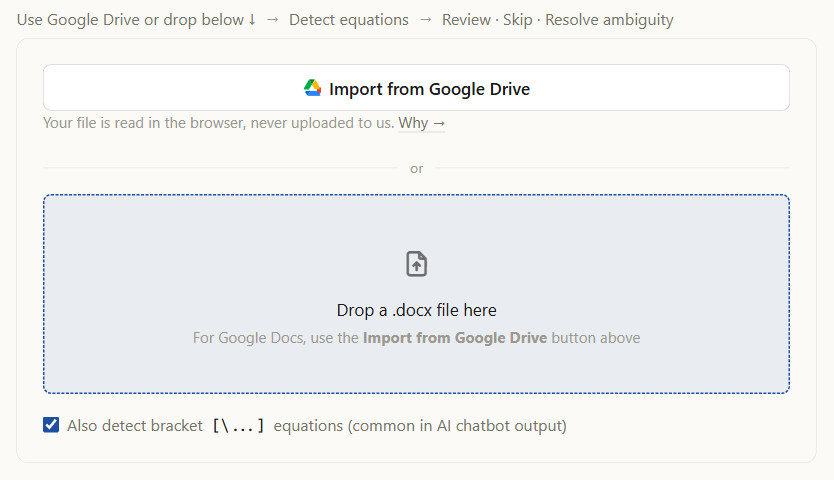
Step 3: review what was found. The Detected Equations list shows one card per formula with a live preview. Press Skip on anything that is not maths; a price such as $100 is the usual case. If a paragraph has a $ that never closes, an ambiguity card asks you to fix the text, rather than the tool guessing.
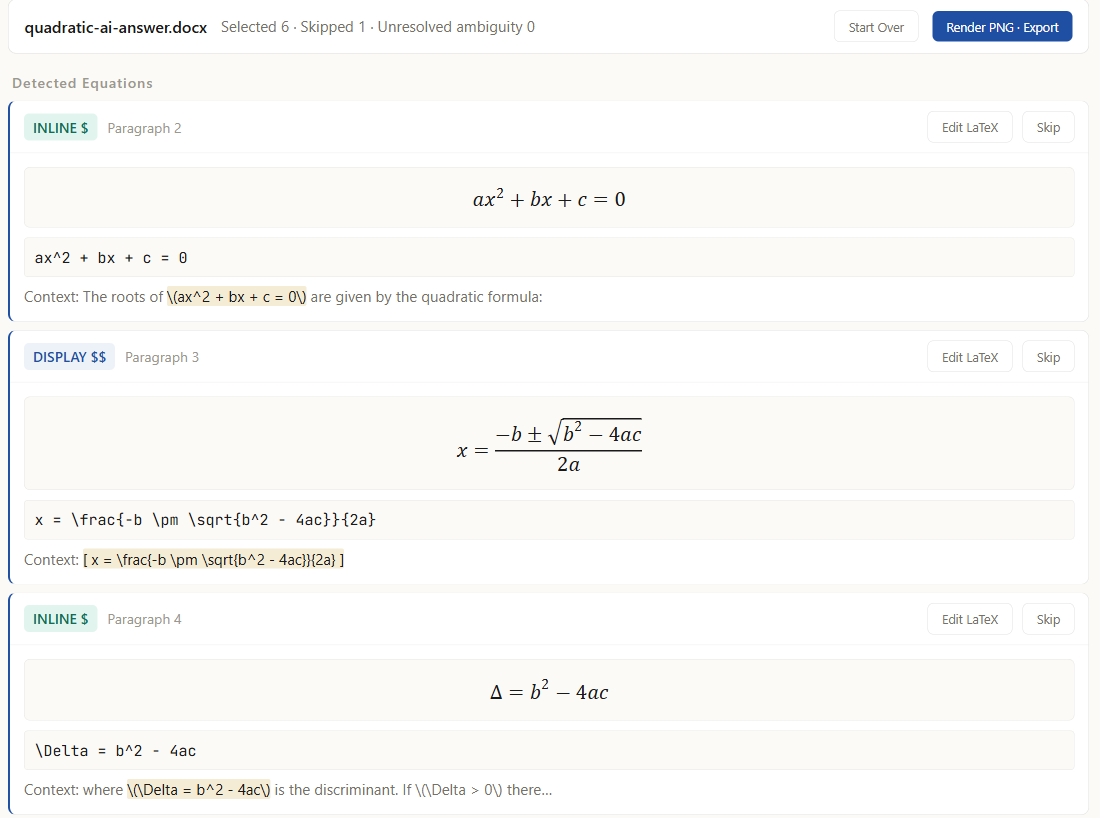
Step 4: Render PNG · Export. Press Render PNG · Export and download the new .docx.
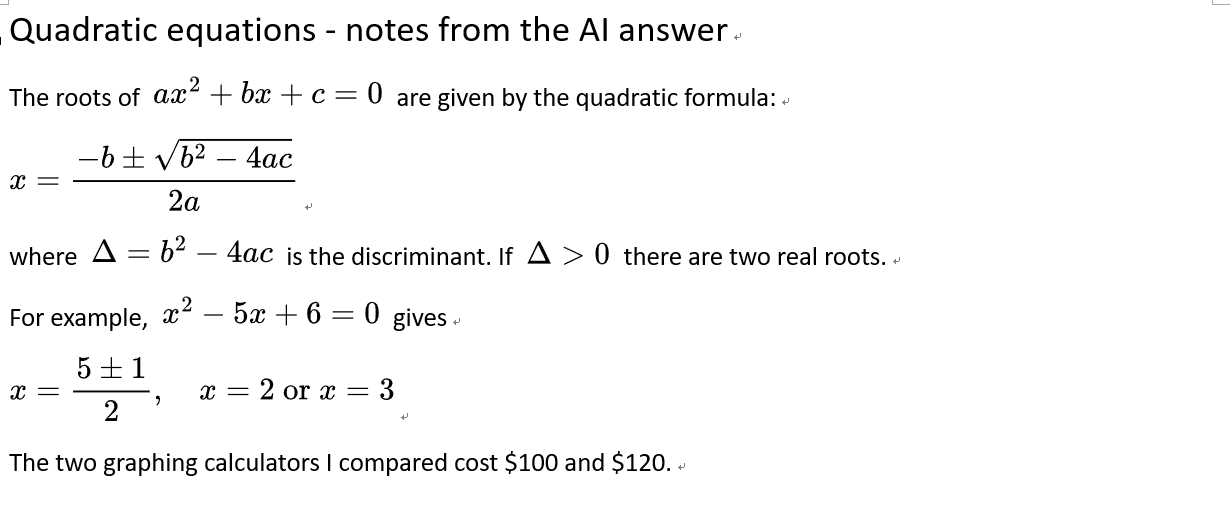
4. What you get back
- Every formula is an image in the place where its LaTeX was.
- The LaTeX is in the alt text of each image, after an
AIMATH_FORMULA::v1::tag. In Word, right-click the image and open the alt text to see it. Nothing needs to be kept in a separate file. - Everything that is not a formula stays as it was: text, headings, tables and other images.
What it is not: the images are not Word equations. You cannot click into one and edit a subscript in Word’s equation editor. To change a formula, copy its LaTeX from the alt text, put the corrected LaTeX back in place of the image, and run the file through Scan again; or, if the document lives in Google Docs™, the LaTeXFlow add-on reads the same tag and turns the image back into LaTeX text.
5. FAQ
Is this a LaTeX to Word converter for a whole .tex file? No. Scan works on a .docx that already has LaTeX in it, and converts the equations. It does not turn a .tex file into a Word document.
Can I get editable Word equations? Not from Scan. It produces images, with the LaTeX kept in the alt text. If you need editable Word equations and have Word 2606 or later, paste the LaTeX into Word, or select it and use Insert › Equation, and Word builds the equation.
Why is LaTeX in Word not working? LaTeX typed into the body of a Word document is ordinary text to Word, so $\frac{a}{b}$ stays as characters. Word builds an equation from LaTeX only when it goes through its equation tools: in Word 2606 or later, paste the LaTeX, or select it and use Insert › Equation. That works one formula at a time; for a document that already holds many formulas as LaTeX text, Scan converts all of them in one pass (section 3).
Is there a LaTeX add-on for Word? Scan is not one: nothing is installed in Word. It is a web page you drop the .docx onto, and you open the .docx it gives back in Word as usual.
Does it work on a Google Doc? Yes: use Import from Google Drive on the Scan page, or convert inside the document with the free Google Docs™ add-on.
Some equations were not detected. Check that each one is inside a delimiter from the table above, and that a display formula sits in a single paragraph. A document with no delimiters at all is covered in Detected 0 Equations.
Does it cost anything? Scan is free.
6. Summary
- Open LaTeXFlow Scan and drop the
.docx. - Review the cards and skip anything that is not maths.
- Press Render PNG · Export and download.
Every LaTeX equation in the document comes back as a rendered equation, with its source kept alongside it.