
Converting a LaTeX paper to Word with the usual free routes keeps the text and most equations, but equation numbers, cross-references, theorem numbers and citations often come out broken or missing. We are building a .tex to .docx converter that keeps them working.
Your paper is written in LaTeX. Your co-author, your supervisor or the journal works in Word. So someone has to turn the .tex into a .docx, and then someone spends an evening fixing what the conversion broke: equation numbers that disappeared, “see (3)” pointing at nothing, theorems without numbers, citations left as bare keys.
We are building a converter for exactly this. Upload your .tex, and get back a Word document your co-author can edit, with the equations, numbers and references still working.
Get notified when it’s ready →
1. What breaks today when LaTeX becomes Word
A LaTeX paper is more than text and formulas. Much of what makes it a paper is computed by LaTeX when it compiles:
- Equation numbers. You write
\label{eq:energy}; LaTeX decides it is equation (2.4). - Cross-references. You write
\eqref{eq:energy}orTheorem~\ref{thm:main}; LaTeX fills in the number. - Theorem numbers. Theorem 3.1, Lemma 3.2, Definition 3.3 — counted the way your preamble says.
- Citations.
\cite{smith2020}becomes [12] and an entry in the bibliography.
The usual free route — an open-source converter at its default settings — moves the text and most of the formulas across, but it does not run LaTeX’s numbering. In our test it kept almost none of these numbers. Your co-author opens a document where “by (2.4)” no longer points at equation (2.4), and the fixing starts.
Here is one passage from one of the arXiv papers we tried, converted both ways and opened in Microsoft Word.
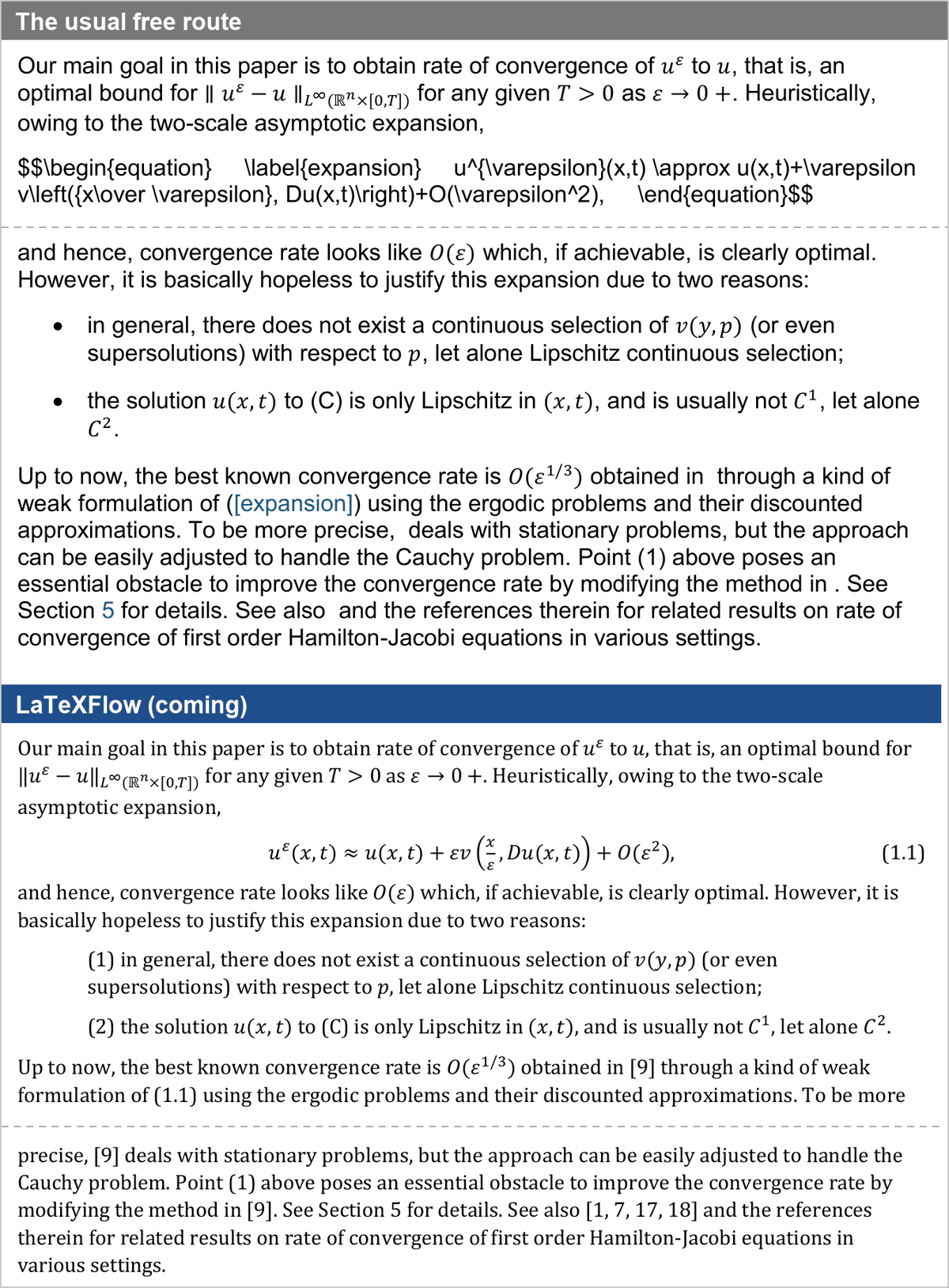 The same passage, both files opened in Word. The usual free route leaves the equation as LaTeX source, prints the reference to it as its label name, and drops the citations. Ours prints equation (1.1), the reference “(1.1)” and the citations [9] and [1, 7, 17, 18]. The dashed line is a page break.
Theorems show the same pattern.
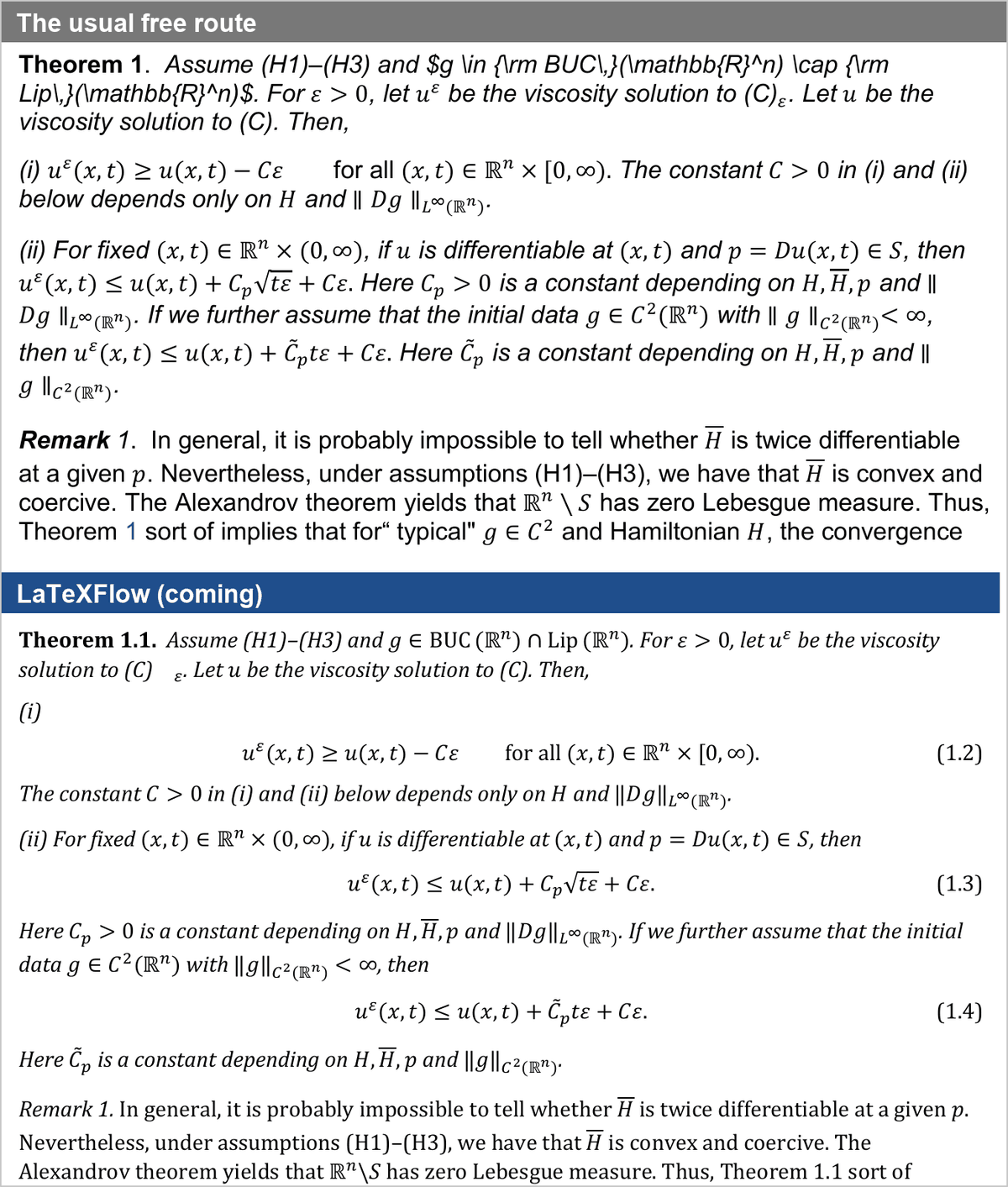 The paper’s Theorem 1.1. The usual free route numbers it “Theorem 1”, leaves part of the statement as LaTeX source, and its three inequalities have no numbers. Ours keeps “Theorem 1.1”, the equation numbers (1.2)–(1.4), and the mention of Theorem 1.1 in the remark that follows.
2. What is coming
A converter in your browser, from a .tex file to a Word .docx:
- Editable equations. Each formula becomes a Word equation, not a picture. Your co-author can click into it and change a sign.
- Equation numbers and cross-references that stay right. Numbers are Word fields and references point at them. Move things around in Word and update the fields, and every “see (2.4)” follows.
- Theorem numbers, figure and table captions, and section numbers, counted the way LaTeX counts them.
- Citations resolved against your bibliography, with the reference list at the end.
- A report of anything that needs a look: an undefined reference, a citation it could not find, an environment it could not convert. Each one is also marked in the document itself, so nothing goes missing quietly.
Press Alt+F9 in Word and you can see the fields behind the passage from section 1.
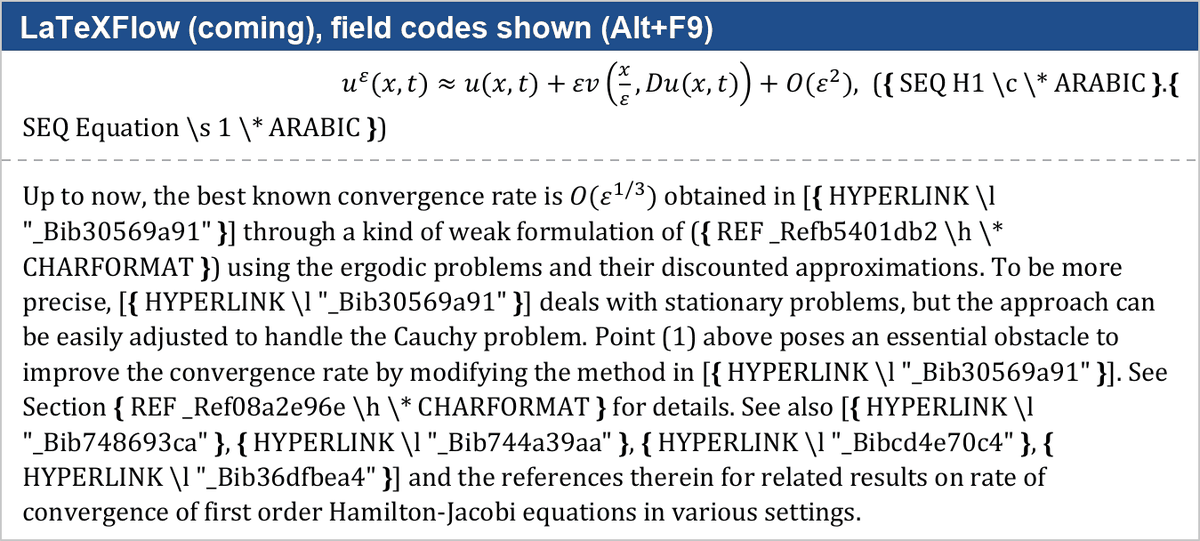 The same passage with Word’s field codes shown (Alt+F9). The equation number is built from SEQ fields, the references to the equation and to Section 5 are REF fields, and each citation links to its entry in the reference list. Alt+F9 again switches back.
The first release takes a single .tex file, with your .bib or .bbl if you have one. Overleaf projects (a .zip with figures) are planned next. The conversion runs in your browser.
3. What we measured
We ran our converter and the usual free route on 144 arXiv papers from mathematics, physics, computer science, statistics and other fields. LaTeX’s own numbers, from compiling each paper, were the answer key. Both routes were measured the same way, and every output was opened in Microsoft Word.
| In our test on 144 arXiv papers, November 2026 | Our converter | The usual free route |
|---|---|---|
| Labelled equation numbers that match LaTeX | 94% | 0% |
| Cross-references that print the right number | 90%, all live Word fields | 18%, as plain text only |
| Theorem numbers that match LaTeX | 96% | under 1% |
| Citations resolved | 84% | 5% |
| Formulas that arrive as editable Word equations | 98% | 77% |
Every one of the 150 papers we tried came out as a .docx that Word opened without a repair prompt. The usual route produced no file at all for 28 of the 150.
These are our development numbers. We will measure again on papers the converter has never seen before it goes live.
4. Who this is for
- You wrote in LaTeX; your co-author edits in Word. They get a document they can track changes in, and the equations are still equations.
- Your supervisor reviews in Word. Their comments land on the same numbered equations you see in your PDF.
- The journal or conference wants a
.docx. You start from a file whose numbering and references already work, instead of retyping them. - You share a draft with someone who does not use LaTeX — a grant office, a lab manager, an editor.
If you work in Google Docs™ rather than Word, the LaTeXFlow add-on already imports a .tex file into a Google Doc.
5. FAQ
Can I convert LaTeX to Word with equations? Yes. Recent versions of Word turn LaTeX you paste into Word equations, which works well for a formula at a time. For a whole paper, you need a file converter. The converter we are building turns every formula into an editable Word equation and keeps the numbering and references around them.
How do I keep equation numbers when converting LaTeX to Word? Word has no equation numbers of its own, so a converter has to rebuild them: count the equations the way LaTeX does, write each number as a Word field, and point every \eqref at it. That is the core of what we are building (94% of labelled equation numbers matched LaTeX in our test). With any converter, compare a few numbered equations and references against your PDF before you send the file.
Can Overleaf export to Word? Yes. Overleaf’s download menu has an export to Word. It keeps the structure of your paper — headings, paragraphs, lists — and is worth trying first for a simple document. If your paper depends on numbered equations, cross-references, theorem numbers and citations, check those in the result, because that is where hand-fixing usually starts.
6. Get notified
The converter is in development now. Leave your email and we will keep you posted as it comes together, and write when it is ready to try. You can also tell us what you would convert, which helps us decide what to build first.